I’ve got a slide deck with a special place in my heart this year. It’s my go-to for putting up something on the board when I need it. What something? Well, that all depends. But whatever it is, my deck is there for me. In today’s quick tip, I want to suggest you curate a deck that will be there for you too.
Part I: Timers
The first part of my deck has timers. Fun rainbow timers, sand timers on the beach, cute animated timers, timers for one minute, two, five, ten, fifteen, etc. Because I’ve dropped them into Slides instead of bookmarking or playlisting them on Youtube, there are no commercials.
When I’m about to launch a partner discussion, writing activity, or out-of-their-seats exploration activity, I can scroll to one of these timers in a few seconds and hit “play,” so everyone knows what’s up. Some kids will be relieved to know the activity will be over soon, if it’s not their jam. Others will want to spend way more time on the activity than they have, but at least the timer will let them know when the end is getting close so it’s not a surprise.
Some of my favorite timers are the animated ones from the Stanford d.School channel and the radial timers from PH Cuber.
As a bonus, having a collection of timers also means I can copy and paste any of them from the slideshow and drop them into slides with other directions. Like if I wanted to have the “We’re Reading” slide guidelines up (more on that in a second), I could pop the ten minute timer right onto it in the corner so everyone would be able to track our trajectory.
Part II: General Guidelines for Different Sorts of Classroom Moments and Structures
Next up, I’ve got a growing library of general guidelines. What I like about building this library of slides is that it feels like an investment in the future every time I make one. Here I have directions for reading workshop, digital work norms, hexagonal thinking, coffee shop work time, clean up time, and more. It’s easy to scroll to one of these if I need it, or to copy it and adjust it slightly for the related thing we’re doing.
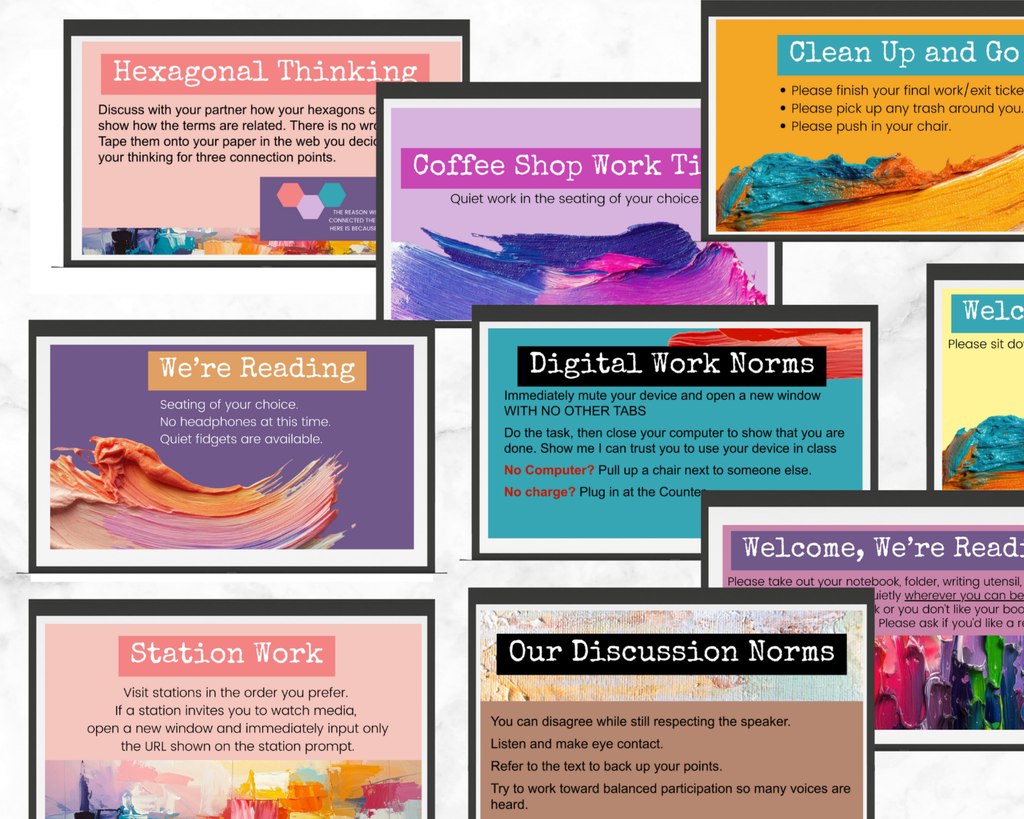
This collection resides in The Lighthouse in the Anytime Resources Section
Part III: Ambient Videos
Pretty much daily I want a fun atmospheric video with a low hum of non-lyric sound on my board as students come in to read. Sometimes it looks like the Hogwarts fireplace, with fire crackling noises that can at least partly cover the small sounds that come along with existence as kids read. Sometimes it looks like a drone video of gorgeous fall leaves. Sometimes it’s gentle, slow-moving coverage of the National Parks. Sometimes it’s a cozy living room in a castle in Scotland, rain pattering on the windows.
Bottom line? I don’t want to go searching in Youtube every time I want to click play on one of these, and I’m OK with some repetition. Many of the videos are hours long, so I could just scroll past the beginning the second time I want to use them, if I really want variety. Plus, by collecting them here instead of searching randomly, I am building a group of great videos in a commercial-free space that I could also use for another class, or share with a colleague, etc.
This National Parks Video is one of my favorite go-tos, and it also plays into the research on how positive it is to showcase nature in your workspace.
Part IV: Multimedia
This is also the slideshow where I drop any videos I am going to play in class. It’s a growing collection of Ted Talks, performance poems, Book Trailers, read-alouds, documentaries, etc. I pop them here so they’re ready to go, commercial-free, and so they’re in this same tab that I always have open anyway.
Plus, again, they’ll be there for the next class if for some reason I don’t get to them, and they’ll all be there if I teach this same class again next year.
Part V: Reading Strategies
This is also where I house specific reading strategies to introduce to students during choice reading time. I can flip to one in a few seconds, and I could return to it anytime as a reminder during reading.
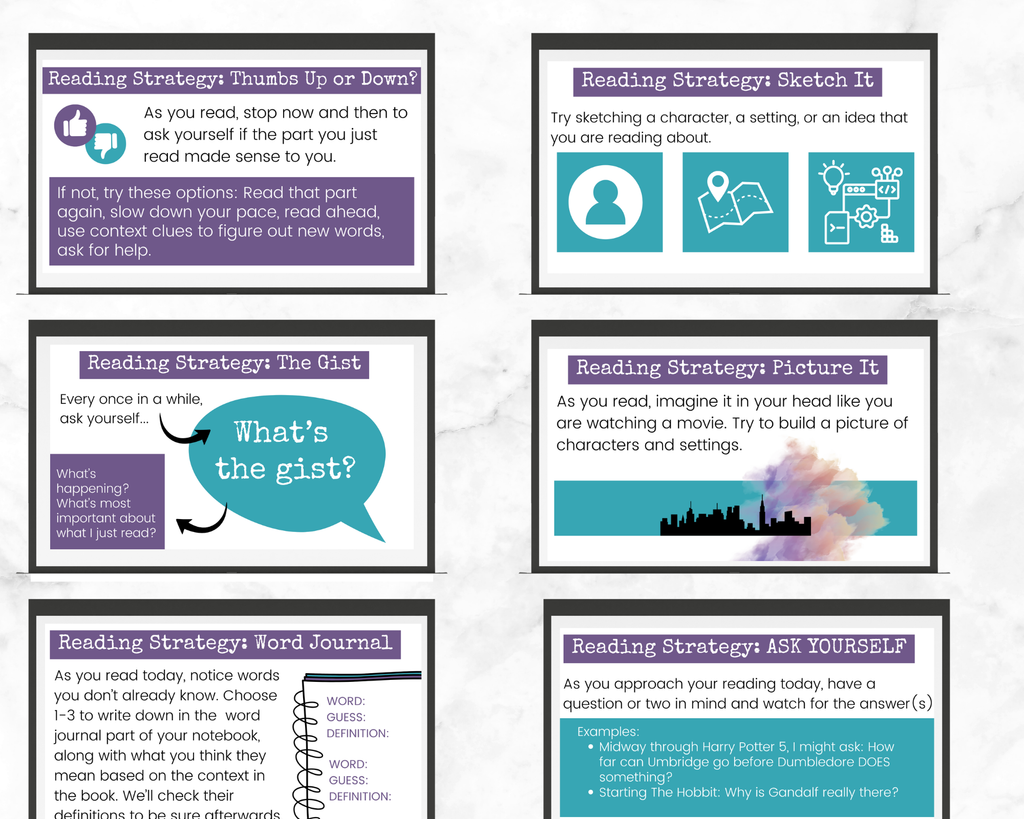
This collection resides in The Lighthouse in the Choice Reading Section
Bottom Line? I love Curating this Collection and I hope you’ll Love Curating Yours
Bottom line with my tip here today, is that I love having so many resources for my Smart Board in one place. I can hit play on a timer or ambient video, add helpful structure to a work time, click across to my multimedia, introduce a reading strategy, or whatever else I want right from this one slideshow.
And on the first slide, I stuck an index that links out to the different sections, because I know eventually this collection is going to be pretty large! I suggest you do the same, making it as easy as possible to use your amazing growing deck for whatever you need that day.
Sources:
Claire English of The Unteachables is the one who really got me started thinking about how useful timers and clear slide instructions can be to help minimize behavior disruptions, after I read her book, interviewed her on the podcast, invited her as a guest in The Lighthouse, and listened in to her podcast! Dive into Claire’s work here.
Inspiration for the reading strategies comes from a variety of sources, including:
Kerkhoff, Shea. (2026). Adolescent Literacy: Integrating the Sciences of Reading and Writing in Grades 4-12. Bloomsbury Academic.
Kittle, Penny. (2013). Book Love. Heineman.
Online Supplementary Videos Associated with Kittle, Penny & Kelly Gallagher. (2018). 180 Days: Two Teachers and the Quest to Empower and Engage Adolescents. Heineman.
Leong, Kristin. (Host). (2025, October 28). The Extraordinary Impact of Drawing to Learn. [Audio Podcast Episode]. In Edutopia’s School of Practice Podcast. https://podcasts.apple.com/us/podcast/the-extraordinary-impact-of-drawing-to-learn/id1840474338?i=1000733852674