Walk into an expensive “Innovation Lab” or High Tech Cutting Edge University Makerspace, and you’ll probably see a laser cutter, a 3D printer or two, all kinds of expensive technology and the adjacent software and screens that make it possible.
That’s cool.
But that’s also a high barrier to entry.
Does it really have to be that way? And how did the maker movement come to sit so deep in pricey STEM territory?
You probably know I’ve always admired the work of Angela Stockman, writing makerspace pioneer. She’s been on this podcast several times, and I love what she shares around having students build ideas across modes, using free or inexpensive materials to help them construct concepts, characters, and storylines.
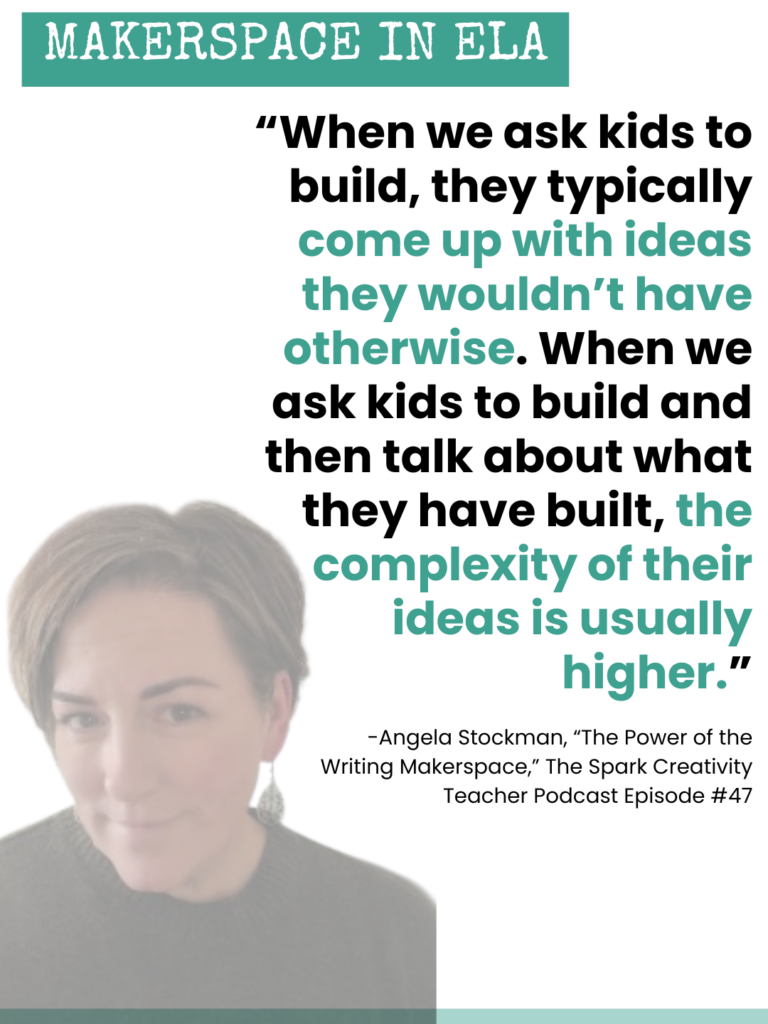
In our interview a few years ago, she said: “When we ask kids to build, they typically come up with ideas they wouldn’t have otherwise. When we ask kids to build and then talk about what they have built, the complexity of their ideas is usually higher.” These feel like very worthwhile goals to me – kids coming up with innovative, complex ideas.
But let’s be clear, we don’t have to ask kids to build on a 3D printer or learn to code in order to help them extend and amplify their thinking through maker tools. Angela has always said that, but the proliferation of high tech makerspaces can be hard to drown out when thinking about this issue.
Making is not about having one specific tool. It’s about what making can give to kids in terms of their development of ideas, as Stockman suggest above, and in their development as learners too (Cohen). When students make, they make choices, they make mistakes, they recover. Ideally, they develop new skills at the same time that they develop a growth mindset around iterating.
Today on the podcast, let’s talk about a fun new free tool I’ve created for you to help your students build their ideas.
Context: Constructionism & The World of Making
Let’s start with thirty seconds on how learners construct knowledge for themselves.
Jean Piaget came up with the idea of constructivism, in which learners take in information from the world, connect it to what they already know, and evolve their own internal understanding of the world in ever-more complex ways. This process all happens inside the head.
Seymour Papert, who worked with Piaget, put his own spin on this theory with his concept of constructionism, in which learners use their growing knowledge to create real artifacts in the world and see what happens as others interact with those artifacts. This process involves the head AND the hands.
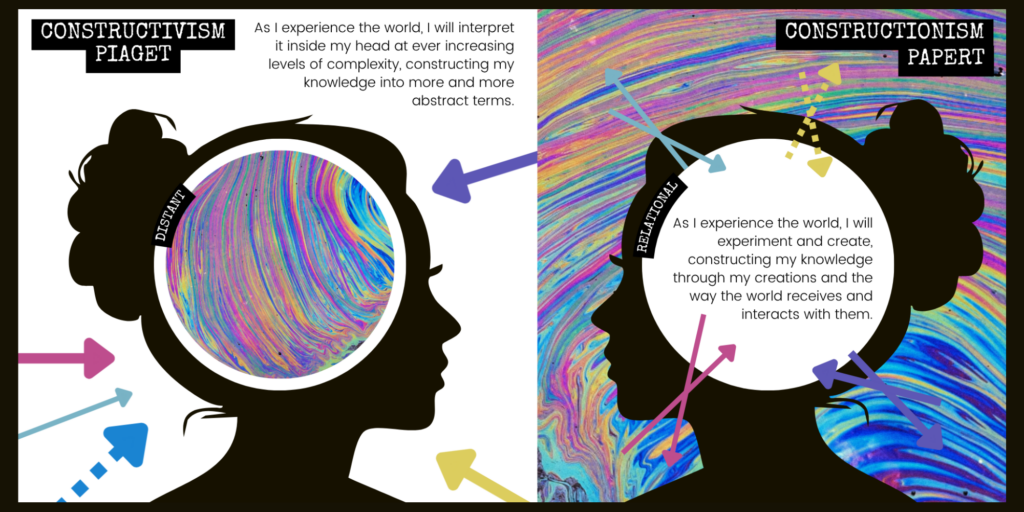
While Piaget’s theory keeps the evolution of ideas in the brain, at an esoteric level, Papert’s theory suggests that ideas need experience. What is an idea if you don’t get to see how it works out in the world? What others think of it? Whether it actually functions as you make something with it?
I’m sure you can see which theory of learning the makerspace fits into. Yep, constructionism.
The Physical Makerspace vs. The Digital One
As I mentioned in the intro, makerspaces have become synonymous with high tech and big money. But it doesn’t have to be that way. I find myself thinking of Jessie J’s song lyrics, a bit of the soundtrack of Pitch Perfect. I’m not going to sing it for you here, but if you’ve seen the movie, maybe you can hear it in your head: “It’s not about the money, money, money. We don’t need your money, money, money. We just wanna make the world dance. Forget about the price tag…”
Angela Stockman has always said that students could use recycled materials, art supplies, items collected from nature, post-its, paper, etc. There’s no need for expensive kits and high-end tech to “make” things.
In their research around makerspace misconceptions among future teachers, Cohen and his collaborators discuss methods “to deemphasize the role of specific technologies and tools.” And in her research studying student makers at a summer camp, Smith cites previous research from Vossoughi and collaborators that provides a “‘caution against the fetishization of tools’ (224).” In other words, making doesn’t require a 3D printer. I think we all knew that, deep down.
I love the idea of an ELA makerspace full of items from nature, art supplies, post-its, chalkboards, and more. But I also know that this can be a lot to manage and organize in a classroom. And even low-cost items do add up. So I set out to create a free maker tool that could replace a physical maker tool that might be low-cost but would still be some-cost, and would still take up teacher time to keep clean and organized.
Having recently watched Richard Culatta’s Tedx Talk, “Reimagining Learning,” and seen him make fun of “innovative” digital learning tools that are really just exact copies of physical classroom tools we used to use, I also wanted my digital tool to somehow go further than a physical one could. To justify pulling out a screen.
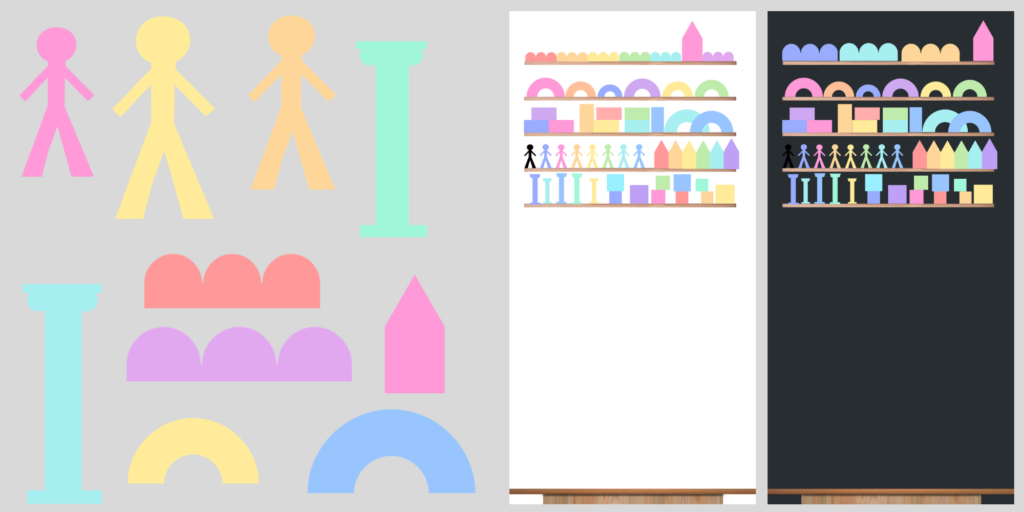
I set about to create inviting, colorful, drag-and-drop idea blocks that students could pull from digital “shelves” to build ideas. I made fifty colorful blocks and dropped them into a little studio canvas where students could play with them in Slides.
But now what?
Unlocking the Digital Potential of this Writing Makerspace Tool
I wanted to try this tool out for myself, to see what it might unlock for me when it comes to building ideas. So I gave myself the prompt I’m often thinking about these days (oh, you too?!): Should students be able to use AI in ELA? Build your Argument.
I stared at the shelf of blocks as all the books, articles, podcasts, social media posts, and Op-Eds around this I’ve consumed swirled around in my head with my own opinions and personal conversations on the topic. Immediately I noticed the pointy blocks, and imagined them hanging over one of the figure blocks, representing a student. Before I had any arguments lined up, I imagined all my opposition to AI points lined up as stalactites hanging down as if they were about to fall on a little student. So I dragged them onto my canvas one at a time, adding text boxes on top as a I began to outline the “cons” of AI use in class. Beneath this row, I set my “student.”
Then I noticed an arch block and began to think about how AI could help build students up or support them. I dragged it below the student so she was standing on top of it and began to add ideas for how AI can support student learning inside that arch.
Next, I thought about my unanswered questions. I pulled more pointy blocks to go on either side of my figure, because to me these unanswered questions feel like risk factors for students, though not as clearly cons as the points I had lined up across the top.
Finally, I began to overlay links and labels, bringing in external sources to my idea build and categorizing the areas on my image into “cons,” “pros,” and “questions.”
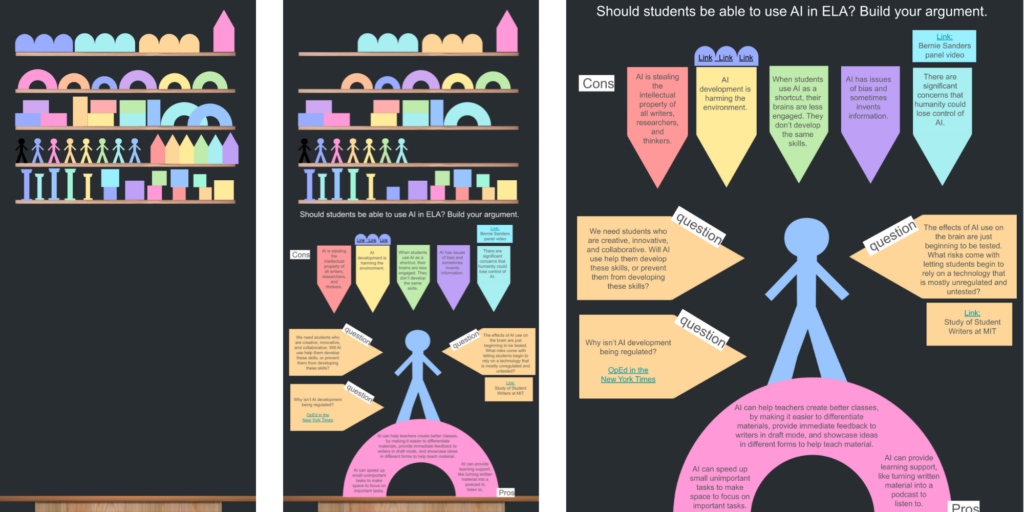
The next step in this process could be for me to discuss this map with someone else thinking about this same prompt, explaining my thoughts and answering questions about my ideas. This would force me to defend my points and strengthen my arguments, or maybe realize where holes in my build exist or where there are important additional counterarguments I might want to address.
Already, though, I found this to be a really intriguing pre-writing (or pre-podcasting, or pre-video creation, or pre-infographic making, etc.) tool. Seeing the blocks helped me think of ways of building and connecting ideas – it pushed me into new ways of organizing my thoughts. And being able to overlay notes and links – not possible with physical blocks – made the digital tool not only convenient and free, but inherently a different experience than the physical one. The final pre-writing creation is a hyperdoc which I could now use to construct a research-based argument that would likely look quite different than any conventionally formatted piece of writing. Certainly it would NOT be a five paragraph essay, since I’ve got five con arguments, three pros, and three unanswered questions, with various external sources and opinions to reference.
How to Get Started with this Tool
You could use this tool with a specific writing prompt or as part of the pre-creation phase of any project, but you could also make it available to writers and creators every time you’re in a writing or project cycle, giving them more agency over how they like to construct meaning.
Just as some kids might prefer sketchnotes over conventional bullet point notes, some kids might like to “build” ideas before they communicate them. Consider using the blocks for a low-stakes prompt or reading check-in one day to help introduce the tool, and letting students see how others use it to help widen their perspective on the options. One you’ve introduced it, you could then start to make it available anytime and all the time as a thinking resource.
Click here to make your copy of the idea blocks.
Sources:
Ackermann, E. (2001). Piaget’s Constructivism, Papert’s Constructionism: What’s the Difference? Future of Learning Group Publication, 5(3), 1-11.
Cohen, J. D., Jones, W. M., & Smith, S. (2018). Preservice and early career teachers’ preconceptions and misconceptions about making in education. Journal of Digital Learning in Teacher Education, 34(1), 31-42.
J, Jessie. “Price Tag.” Spotify Lyrics. https://open.spotify.com/track/2vR1oGQdPfwJe4EVh8uNGc
Kretchmar, Jennifer. “Seymour Papert and Constructionism.” EBESCO: https://www.ebsco.com/research-starters/religion-and-philosophy/seymour-papert-and-constructionism. 2021.
Potash, Betsy (Host). (2018, September 6). The Power of the Writing Makerspace, with Angela Stockman (No. 47). [Audio Podcast Episode]. In The Spark Creativity Teacher Podcast. https://nowsparkcreativity.com/2018/09/the-power-of-writing-makerspace-with.html
Smith, S. (2018). Children’s Negotiations of Visualization Skills During a Design-Based Learning Experience Using Nondigital and Digital Techniques. Interdisciplinary Journal of Problem-Based Learning, 12 (2). Available at: https://doi.org/10.7771/1541-5015.1747
Stockman, Angela. (2016). Make Writing: 5 Teaching Strategies That Turn Writer’s Workshop into a Maker Space. Hack Learning Series.
TEDxTalk. (2013, January 10). Reimagining learning: Richard Culatta at TEDx Beacon Street [Video]. YouTube.